Quick start
This walks through one complete analysis using the built-in demo dataset. It takes about five minutes.
The demo, PTY087I2, is a Streptomyces elicitation study: a solvent blank, a media control, and cultures grown with 0 µM and 250 µM cerium, each in biological and technical triplicate. It has about 4,950 features across 30 injections and comes with an MS/MS fragment database.
1. Sign in
Open app.mpactms.org. Enter your email address and type in the six-digit code that is sent to you. The first sign-in creates your account, and there is no password to remember.
A self-hosted server may use a shared access code or no sign-in at all. See Sign-in and accounts.
2. Load the demo dataset
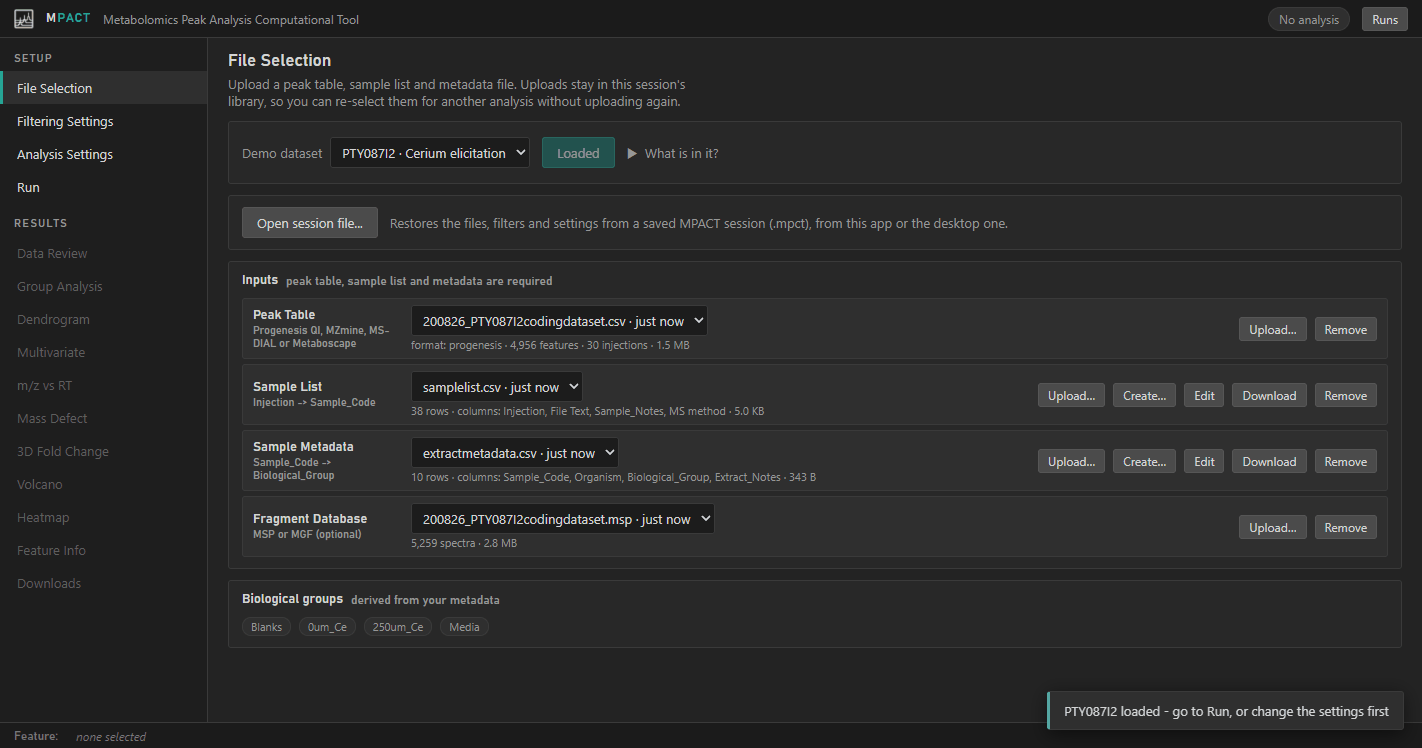
On File Selection, leave PTY087I2 · Cerium elicitation selected in the Demo dataset list and click Load. All four input slots fill in, and the biological groups found in the metadata appear at the bottom of the page.
3. Check the settings
The defaults suit the demo, so you can skip this step. To see what they are:
- Filtering Settings turns on all four filters, uses
Blanksas the blank group, and sets the CV threshold to 0.2. - Analysis Settings chooses the two groups the statistics compare. For this
dataset, set Experimental Group to
250um_Ceand Control Group to0um_Ce.
4. Run the analysis
Open Run, optionally type a label such as Cerium demo, and click Run.
The pipeline's log streams into the page while it works. The demo finishes in
a few seconds, and the chip in the top bar changes to Analysis complete.
5. Explore the results
The tabs under Results in the sidebar are now enabled.
- Data Review reports how many features each filter removed and how reproducible the data are.
- Volcano shows which features change between the two groups you chose. Click a point to open its details in the panel on the right.
- Feature Info lists every feature in a sortable table. The first time you open it, features are matched against the Natural Products Atlas by mass. Click Search MS/MS to match their fragment spectra against the MS-DIAL library as well.
- Downloads has every output file, including a
.mpctsession file that reopens the analysis later.
Next steps
- The interface explains the layout and how selection works.
- Input files explains how to prepare your own data.